Install a Key Bridge CBSD Client Certificate on a Baicells eNB
Introduction
In this procedure you will issue a Key Bridge CBSD client certificate and private key, then install them on a Baicells eNB so the radio can register directly with the Key Bridge SAS.
Baicells CBRS radios are generally not issued with a CBSD client certificate. To use them with a SAS you must either manage them through a Domain Proxy or install an aftermarket certificate. This procedure covers the aftermarket-certificate path for Key Bridge Direct SAS.
Preconditions
Confirm these items before you begin. You will need them in the steps that follow.
- You have a Key Bridge account and can log in at https://keybridgewireless.com/user.
- You know the Baicells eNB management address and login credentials.
- The eNB is powered on and reachable on the management network.
- You have the device FCC ID and product serial number (collect these from the Baicells eNB so you can copy and paste them into the certificate form).
- You have already completed any required CPI certificate upload to the Key Bridge portal (for Category B devices).
At this point you have the accounts, credentials, and access you need. You are ready to begin Step 1.
Step 1: Issue the Device Certificate
In this step you create a CBSD client certificate and private key in your Key Bridge account and download both files. You also record your Account ID for use on the radio.
- Log in to the Key Bridge account manager at https://keybridgewireless.com/user.
- From the navigation menu, select your organization name under the Organizations list.
- Select Account from the menu.
- Record your 36-character Account ID (format
xxxxx-xxxx-xxxx-xxxxx). You will enter this value later as the User ID on the radio.
- Select Certificates.
- Click the New X.509 button.
- Select the CBRS Device tab.
- Complete the form.
- Click the Generate Device Certificate button.
- Download the Certificate file.
- Download the Key file.
- Sign out of the Key Bridge account manager.
At this point you should have your Account ID recorded and both the Certificate file and the Key file downloaded. You are ready to proceed to the Baicells radio.
Step 2: Install the Device Certificate on the Baicells eNB
In this step you open the SAS Settings page on the Baicells radio, point it at the Key Bridge SAS, enter your Account ID, and upload the certificate and key you downloaded. With Auto Enable left on, the radio registers automatically after you save.
- Log in to the Baicells eNB (see the Baicells eNB Configuration Guide for the login procedure).
- In the left navigation column, select Common Settings > SAS Settings.
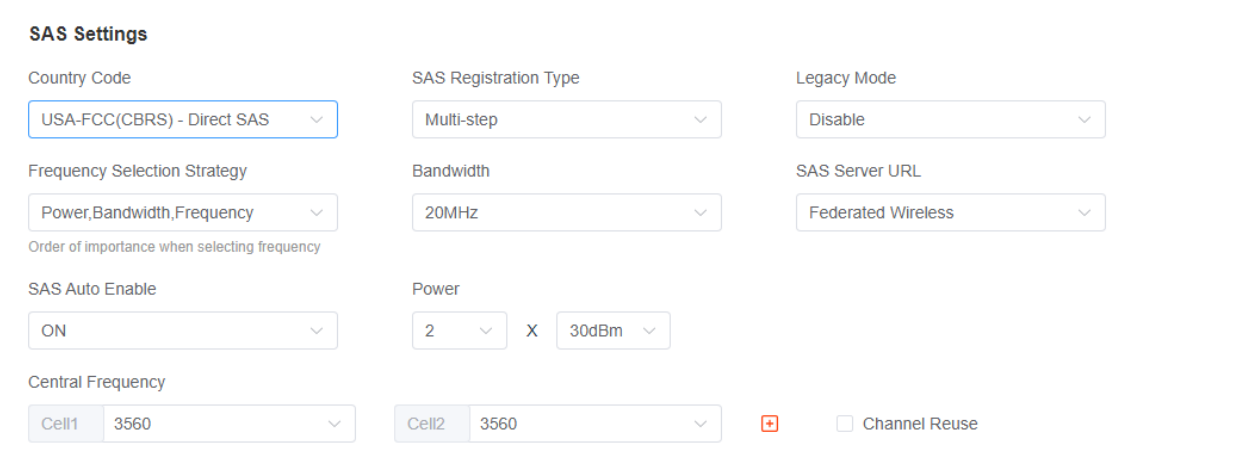
- Set Country Code to USA-FCC (CBRS)-Direct SAS.
- Set SAS Server URL to Key Bridge Wireless.
- Leave SAS Auto Enable set to ON (the radio will register automatically after you save).
- Enter your Key Bridge Account ID (from Step 1) in the User ID field.
- Complete the remaining fields on the form as required by your installation. These fields are independent of the Key Bridge certificate and are covered in the Baicells guide. Baicells presents registration type, installation parameters, antenna settings, and related values on the same page.
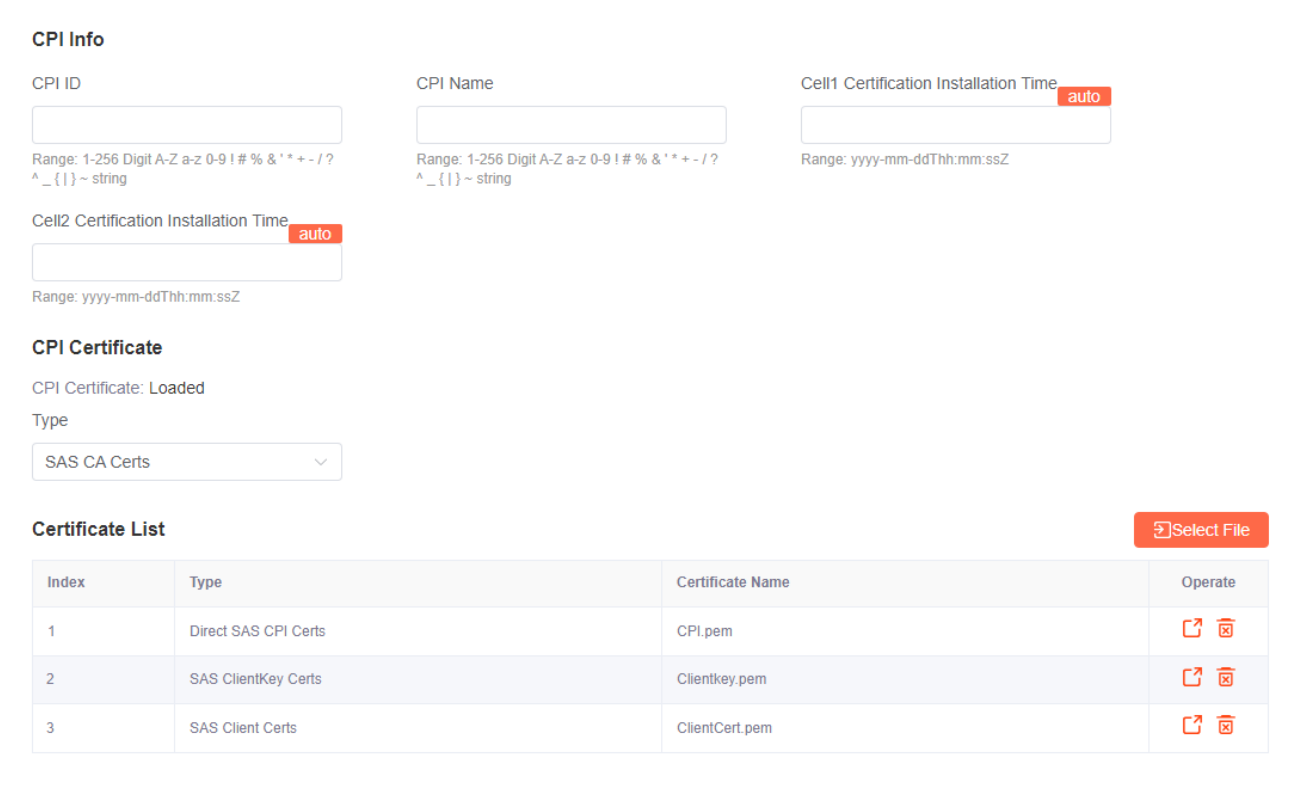
- Under the CPI Certificate section, upload the client certificate and key:
- From the certificate-type list, select SAS Client Certs.
- Click Select File, choose the Certificate file you downloaded, and upload it.
- From the certificate-type list, select SAS ClientKey Certs.
- Click Select File, choose the Key file you downloaded, and upload it.
- Click Save.
If the eNB operates in dual-carrier mode, the SAS registration for cell1 and cell2 must be initiated separately. With SAS Auto Enable set to ON the radio handles the registration after the save.
At this point the client certificate and key are installed, the radio is configured for the Key Bridge SAS, and Auto Enable is on. The radio should begin registration automatically. You are finished with this procedure.
Result
These are the outcomes of the procedure. When you finish, the radio is ready to authenticate to the Key Bridge SAS.
In this procedure you:
- Recorded your Key Bridge Account ID.
- Issued and downloaded a CBSD client certificate and private key.
- Configured the Baicells eNB for Direct SAS with Key Bridge Wireless.
- Installed the client certificate and private key.
- Enabled automatic registration with the Key Bridge SAS.
The radio can now authenticate to the Key Bridge SAS. Log in to the Key Bridge CBRS portal and confirm that the new device appears as registered.
Troubleshooting
If the device does not appear as registered in the Key Bridge CBRS portal, contact us for help. Include your Account ID in the message body for a faster response.

